Do You Need to Register for VAT?
You must register for VAT if your taxable turnover exceeds the VAT registration threshold of £90,000 in any 12-month rolling period. You can also register voluntarily below this threshold if it benefits your business — for example, to reclaim VAT on purchases.
ComptaFlow UK supports both VAT-registered and non-VAT-registered businesses. Simply set your VAT scheme in Settings, and all calculations adjust automatically.
UK VAT Rates
| Rate | Percentage | Applies to |
|---|---|---|
| Standard | 20% | Most goods and services |
| Reduced | 5% | Home energy, children's car seats, sanitary products |
| Zero-rated | 0% | Food, books, children's clothing, public transport |
| Exempt | N/A | Insurance, education, health services, finance |
| Reverse Charge | Varies | Construction services (CIS), imported services |
ComptaFlow UK includes all UK VAT rates pre-configured. When entering a transaction, select the appropriate rate and the plugin calculates the VAT automatically.
VAT Schemes Explained
HMRC offers several VAT schemes designed to simplify accounting for small businesses. ComptaFlow UK supports all of them:
📋 Standard VAT
The default scheme. You charge VAT on sales, reclaim VAT on purchases, and submit quarterly returns. Suitable for most businesses.
📊 Flat Rate Scheme
Pay a fixed percentage of your gross turnover to HMRC. Simpler calculations, but you cannot reclaim VAT on most purchases. Best for businesses with low expenses.
📅 Annual Accounting
Submit one VAT return per year instead of four. Make interim payments throughout the year based on estimated liability. Good for businesses with predictable income.
💰 Cash Accounting
Account for VAT when you actually receive or make payments, rather than when you issue or receive invoices. Helps with cash flow for businesses with slow-paying customers.
Managing VAT in ComptaFlow UK
ComptaFlow UK automates the most tedious parts of VAT management:
⚙️ Configure Your Scheme
Go to ComptaFlow UK → Settings → VAT Settings. Select your VAT scheme, enter your VAT registration number, and set your quarterly periods. The plugin handles the rest.
📝 Automatic VAT on Every Entry
When you enter a sale or expense, select the VAT rate and the plugin automatically calculates the net amount, VAT amount, and gross total. Every entry creates proper double-entry journal postings.
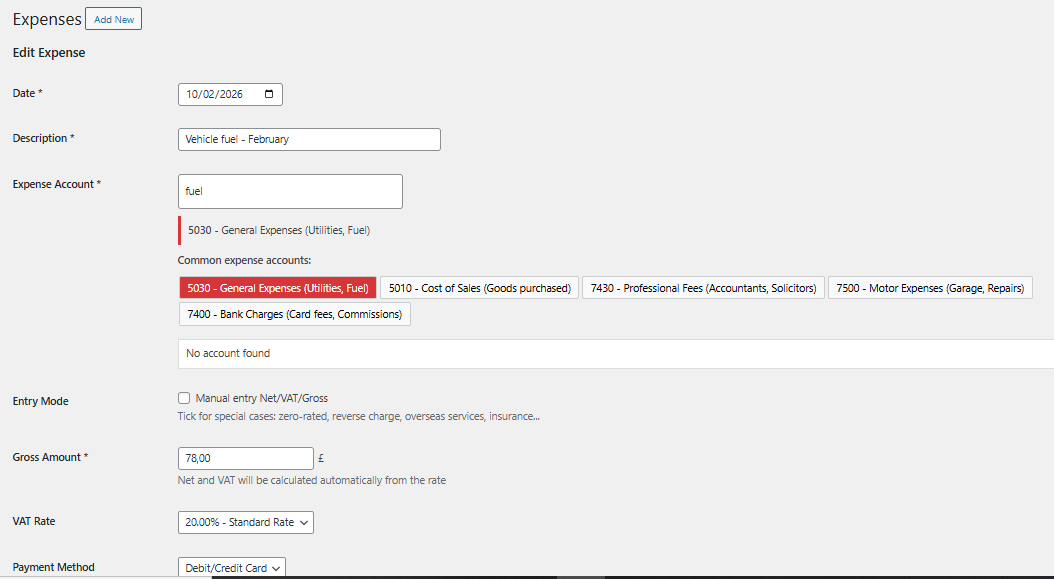
Automatic VAT calculation on every entry — select the rate, the plugin does the maths
📊 Quarterly VAT Returns
At the end of each quarter, go to ComptaFlow UK → VAT Returns. The plugin automatically calculates your Output VAT (Box 1), Input VAT (Box 4), and the net amount due or refundable. Simply verify the figures and submit through HMRC's online portal.
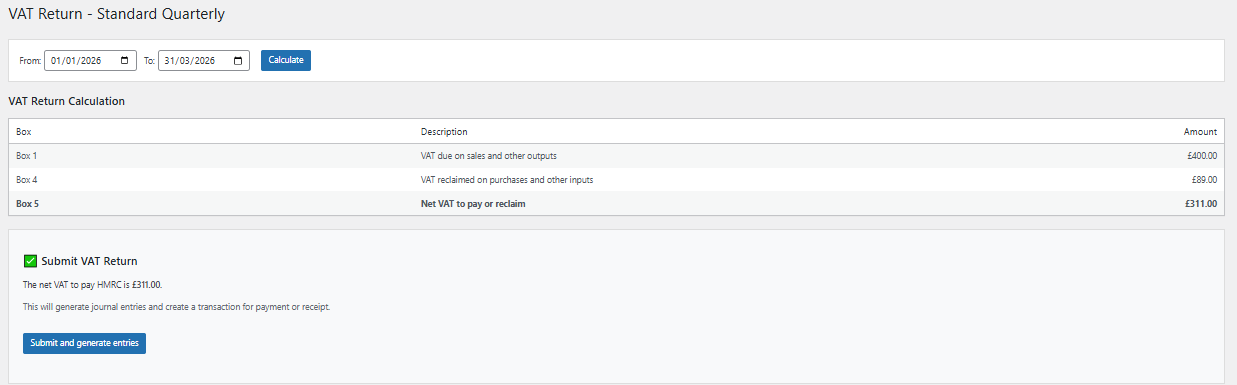
Quarterly VAT Return pre-calculated — verify and submit to HMRC
📈 VAT Tracking Dashboard
Your dashboard shows a real-time summary of VAT collected vs VAT paid, so you always know your current liability. No more end-of-quarter surprises.
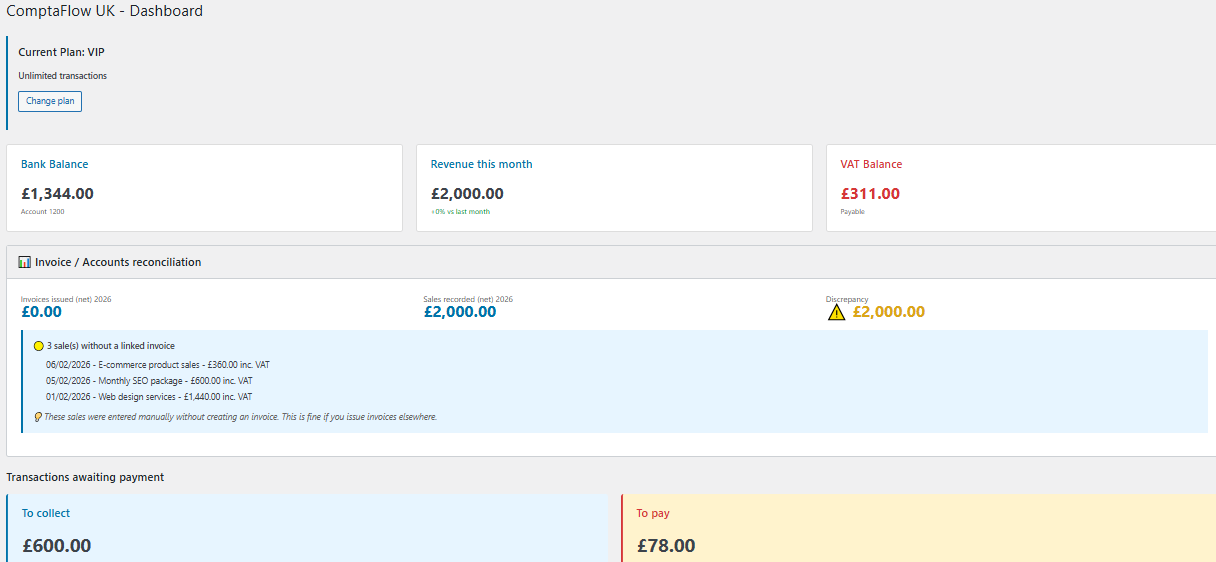
Real-time VAT position visible on your dashboard
Common VAT Mistakes to Avoid
Simplify Your VAT Management
Stop dreading VAT returns. ComptaFlow UK calculates everything automatically from your daily entries. Pro plans from £9.99/month with a 30-day free trial.