What is Bank Reconciliation?
Bank reconciliation is the process of matching the transactions in your accounting records to the transactions on your bank statement. It ensures that your books are accurate, nothing is missing, and every pound is accounted for.
For HMRC compliance and good business practice, regular bank reconciliation is essential. It catches errors early, identifies missing entries, and gives you confidence that your financial reports are correct.
How It Works: 3 Simple Steps
Import
Download a CSV statement from your bank and upload it to ComptaFlow UK.
Match
The plugin shows bank lines alongside your records. Click to match, or flag unmatched entries.
Confirm
Review matched items, investigate discrepancies, and mark the period as reconciled.
Step 1: Import Your Bank Statement
Download a CSV export from your online banking. Most UK banks offer this feature — usually under "Download statements" or "Export transactions". Then upload the file in ComptaFlow UK → Bank Reconciliation → Import.
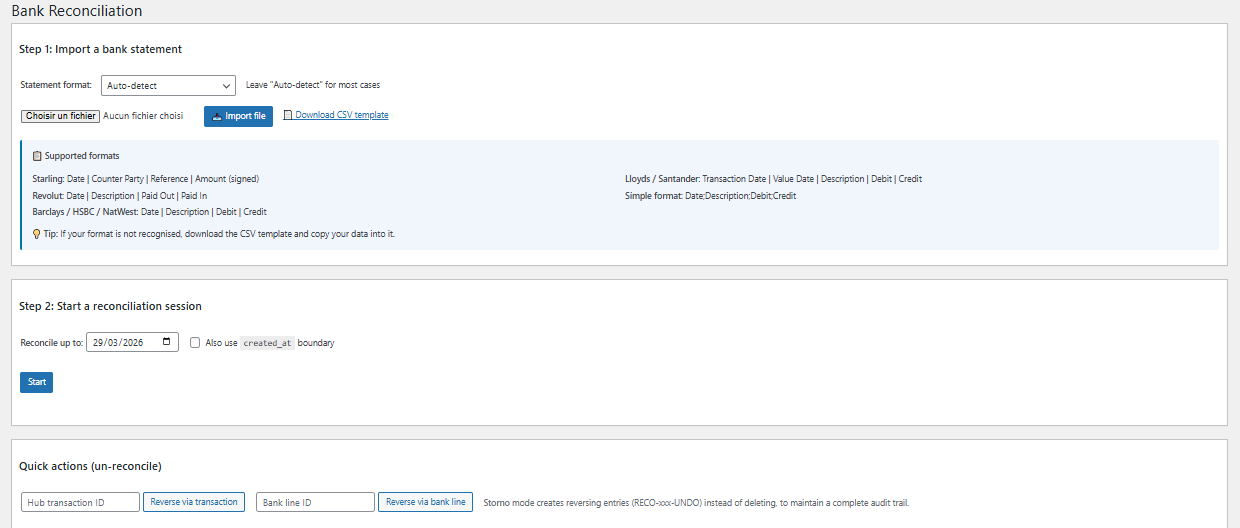
Upload your bank CSV — ComptaFlow UK reads the date, description, and amount columns
Compatible With All UK Banks
ComptaFlow UK accepts standard CSV exports from all major UK banks:
Step 2: Match Transactions
The matching screen shows your bank statement lines on one side and your ComptaFlow UK entries on the other. Match them by clicking — the plugin highlights potential matches based on amount and date.
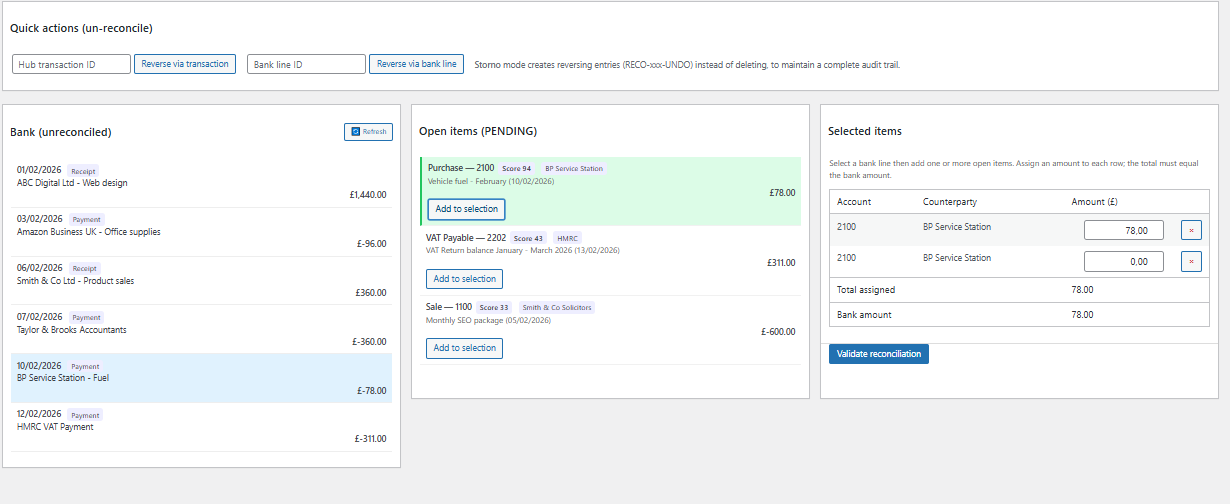
Side-by-side matching — click to link bank lines to your accounting records
What you'll typically find during reconciliation:
Why Reconcile Regularly?
Tips for Effective Reconciliation
2. Record expenses promptly — Enter receipts the same day. The longer you wait, the harder it is to remember what a transaction was for.
3. Use descriptive references — When recording entries, include the supplier name or invoice number. This makes matching much faster.
4. Check the opening balance — Before importing, verify your ComptaFlow UK bank balance matches your real bank balance at the start of the period.
5. Investigate every discrepancy — Don't ignore small differences. A 50p discrepancy today could indicate a bigger problem.
Reconcile Your Bank in Minutes
Bank reconciliation is included in all Pro plans. Import, match, and confirm — directly from your WordPress dashboard. 30-day free trial, no card required.